

Every business its own way. One platform.
Sales, bookings, customer base, inventory, memberships — your business installs exactly the solutions it needs. A salon, a fitness club and a restaurant all build their own system on the same platform.
Your business, your space, your solutions
In Solocean every business is a separate tenant: with its own address, its own isolated data and its own set of solutions. The system shapes itself around you — not the other way around.
A tenant is created
After signing up, your business gets its own address. Your data is yours alone — fully isolated from other businesses and exportable at any time.
Solutions are installed
You pick the solutions your business needs from the marketplace. Bookings for a salon, memberships for fitness, a table map for a restaurant — every tenant builds its own set.
The panel shapes itself
Menus, dashboard and reports assemble automatically from the solutions you installed. You see nothing you don't need — every screen shows only your workflow.
Like Lego: take what you need
Every solution installs independently and works in sync with the rest — make a sale at the register and stock levels, staff commission and customer history all update instantly.
Services
v2.4Service / product catalog, categories, duration and pricing. The foundation of POS and bookings.
Bookings
v3.1Staff-column calendar, status kanban and group class schedule. SMS reminders.
Memberships
v1.8Subscription plans, member check-in, remaining visits, freeze / renewal.
Inventory
v1.2Products, FIFO batches, purchase orders, suppliers, stocktaking.
Restaurant
v1.0Table map, table-based ordering, courses and bill splitting.
Access control
v0.6 βDoor / turnstile entry with QR or card. Automatic permission with Memberships.
+ Packages, gift cards and new solutions are added every month. If you remove a solution, anything that depends on it warns you in advance.
Real views from inside the panel
Live screens from the demo environment — an interface that adapts to your brand, a fast workflow.
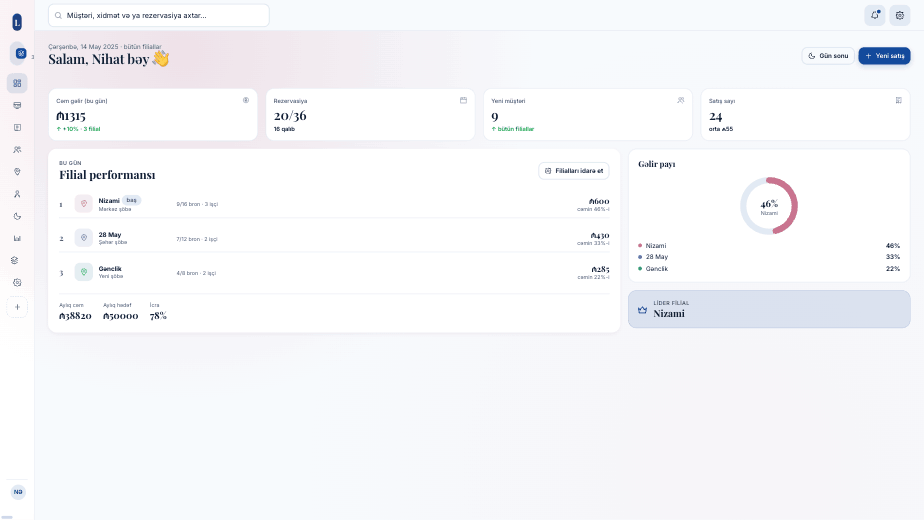
The daily picture across all branches — revenue, bookings and branch performance on one screen.
Set up your business in 2 minutes
Enter your details, choose your solutions — the tenant is prepared automatically.
In the words of business owners
From salons to restaurants, more than 140 businesses work with Solocean every day.
I used to keep records in a notebook and Excel. Now the end-of-day report is one click away.
We installed the membership and access control solutions at our fitness club — the turnstile works automatically, no queue at the front desk.
When we switched to a restaurant we didn't have to change systems — we added the table map solution and the POS stayed the same.
Frequently asked questions
What is a tenant and where is my data stored?
What if my business type isn't on the list?
Can I add or remove a solution later?
Does it work with POS hardware?
Is there a free trial?
How do I migrate data from my old system?
Set up your business now
Fill in the first step right here. When you click “Build your business”, sign-up continues from the solutions step — step two.